

Line items
Manage auction rules, compare performance, and organize your work with saved views.
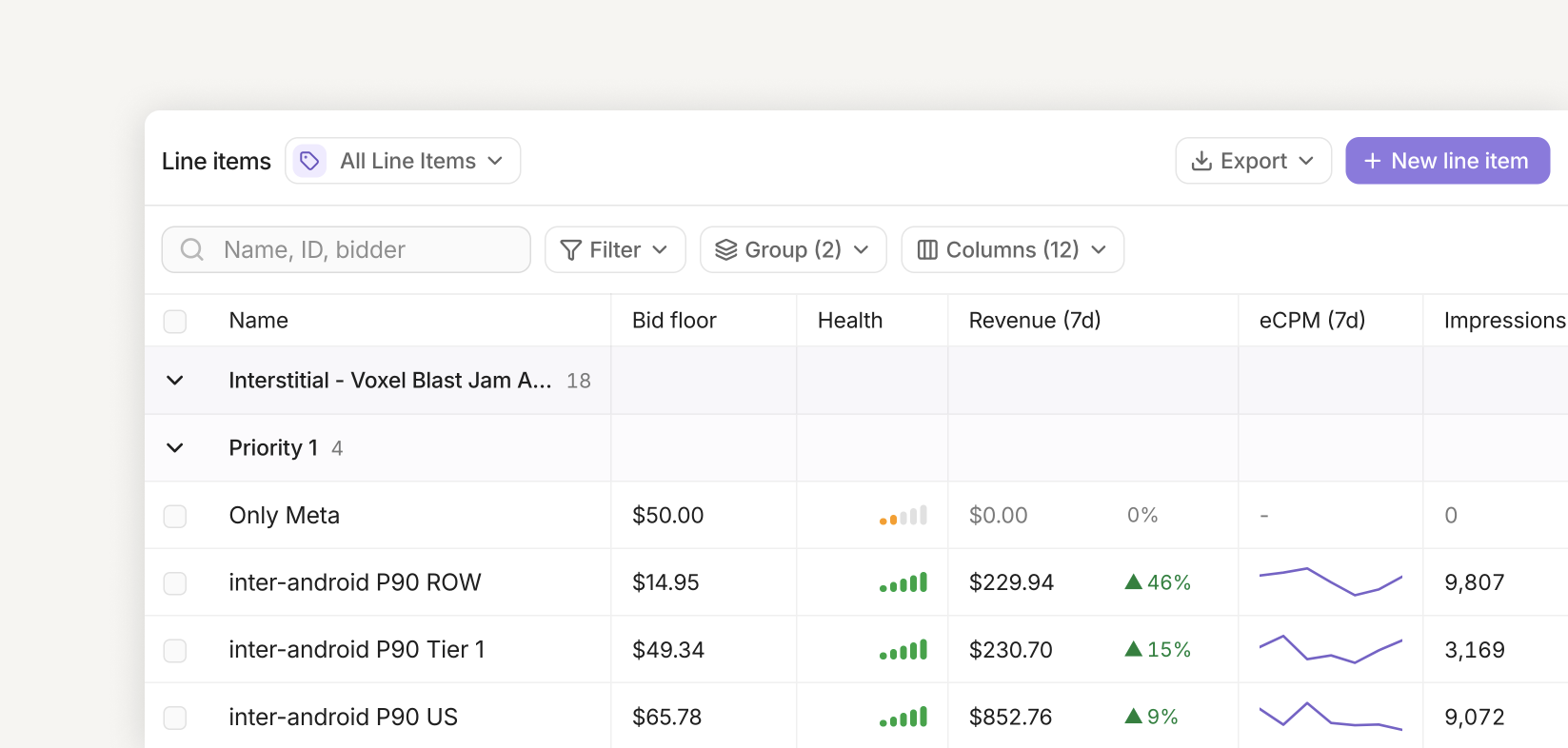
Line items define which bidders compete for your inventory, the minimum price they must meet, and the audience they can reach. Open Line items in the dashboard to review performance and manage these rules in one place.
List view
Find and organize line items
Search by name, ID, or bidder, then use Filter to narrow the list by priority, bidder, ad unit, app, tag, status, country, flight status, or who created or last updated an item.
Use Group to organize rows by app, ad unit, ad format, priority, or status. Add a second grouping level to see, for example, each ad unit’s line items grouped by priority. Expand or collapse groups to focus on the rows you need.
List filters only change what you see. To change which traffic a line item can serve, edit its targeting.
Customize columns
Open Columns to add, remove, or reorder columns. Drag a column edge to resize it, and use its header menu to sort or adjust its settings. The Name column stays first.
| Columns | Use them to review |
|---|---|
| Bid floor, priority, status, bidders | Auction configuration and demand sources. |
| App, ad unit, targets, tags, flight dates | Inventory, audience rules, and scheduling. |
| Health | Delivery and configuration checks. Hover over the indicator for details. |
| Revenue, eCPM, impressions, winning auctions | Performance for each line item. |
| ID, created on/by, last updated on/by | Identifiers and change history. |
You can add the same metric more than once with different settings—for example, Revenue (24h) beside Revenue (7d). Each metric column has its own reporting window. Seven-day metrics support numbers, sparklines, or bars; 24-hour metrics display numbers. Enable period comparison to see changes against the previous period.
A Targets column can show all targeting rules or focus on one dimension and its include/exclude rules. Use footer calculations, such as count or sum where available, to summarize the filtered rows.
Review health and performance
Health summarizes seven-day delivery and configuration checks on a scale of one to five bars. Hover over it to understand what needs attention. Draft, paused, and not-yet-started line items are not scored.
Winning auctions counts auctions won by the line item; Impressions counts ads that were rendered. eCPM is revenue divided by impressions, multiplied by 1,000. Review these metrics together when investigating delivery or comparing floors.
Row actions and exports
Click a line item name to open its settings. Select row checkboxes to Duplicate, Delete line items, or Ask CloudX about the selection. Editing actions require edit access, and deletion requires confirmation.
Selections can remain selected after filtering hides them. Check the selection bar’s hidden-row count before applying an action.
Use Export to download the current view as CSV or Excel. The export follows the filtered rows, visible columns, and sort order.
Saved views
Saved views keep a useful table setup ready to reopen: columns and widths, metric settings, sorting, grouping, filters, submitted search terms, and footer calculations.
- Start with All Line Items and arrange the table for your workflow.
- Click Save as view, then give the view a name, icon, and color.
- Reopen it from the view picker beside the page title.
To build a view from the picker, choose Add new view, then Start from scratch or Build with AI. For example, ask for active interstitial line items grouped by app, with seven-day revenue and eCPM.
After adjusting a saved view, click Save changes to keep the new setup or discard your changes to restore it. Use the picker to rename, duplicate, reorder, or delete views. Saved views are shared within your workspace; creating or changing them requires edit access.
Individual settings
Click New line item to create a rule, or open an existing line item and click Edit. The editor has three sections: General, Targeting, and Advanced. Review your configuration, then click Save and confirm any update prompt.
General settings
| Setting | Description |
|---|---|
| Line item name | A descriptive name that is easy to find in the list. |
| Priority | Auction order from 1 (highest) to 12 (lowest). The default is 8. |
| Price floor | Minimum bid CPM in USD. Bids below this floor cannot win this line item. |
| Target type | Choose one Ad unit, or an Ad unit group to apply the rule to every ad unit in the group. An empty group cannot serve ads. |
| Bidders | Select one or more demand sources. Complete any required network mappings so the selected bidders can participate. |
| Status | Draft saves the configuration without serving. Active allows serving when targeting and scheduling match. Paused stops serving temporarily. |
A draft can become active. Once activated, a line item cannot return to draft; switch between active and paused as needed.
Targeting
Click Add Targeting Field to add audience criteria. Use Include to match selected values and Exclude to block them where those controls are available.
| Field | What it matches |
|---|---|
| Country, language | The user’s country or language. |
| Operating system | Operating system and version criteria. |
| App Version | Exact app versions or a minimum version. |
| Connection Type | The device’s network connection type. |
| IFA Presence | Whether a usable advertising identifier is present. |
| Session Depth | Session depth across all formats or for a specific format. |
| Session Duration (Seconds) | Elapsed session time in seconds. |
| Custom Field | A custom key and value supplied with the request. |
IFA Presence targeting
Choose Any IFA, Has IFA, or No IFA. A usable IFA is non-empty after trimming whitespace and is not the nil UUID 00000000-0000-0000-0000-000000000000. Identifier presence and tracking permission are different signals.
App Version targeting
Enter an exact version such as 6.5.5, or add + for that version and above: 6.5+ matches 6.5, 6.5.1, and 6.10. Only the numeric part is compared, so 6.5.5-debug matches 6.5.5.
Inventory YAML examples
Set ifa_present to true for Has IFA, false for No IFA, or omit it to match either state. Use app_versions for app version rules.
target:
  ifa_present: true
  app_versions: ["6.5+"]
  exclude:
    app_versions: ["6.7"]
Ad Tracking keys are retired and no longer accepted. Remove att_status, attStatus, att, exclude.att, and exclude.att_status from inventory YAML. Do not translate their values into ifa_present; use that field only for identifier-presence targeting.
Advanced settings
Flight dates and schedule windows
Flight Dates set the overall start and end in UTC. Leave the start empty to start immediately, or the end empty for no end date.
Schedule Windows restrict serving to selected weekdays and hours in the device’s local timezone. Start times are inclusive and end times are exclusive. For an overnight window, set the end earlier than the start, such as 22:00–06:00. Without schedule windows, the line item can serve at any local time within its flight dates.
Tags
Add existing tags or create a new tag for exclusive traffic routing. Copy the exact tag ID for your SDK integration. Untagged line items serve only requests without tags. See Tags for routing and frequency caps.
Blocked domains/categories list
Select a Blocked Domains List or Blocked Categories List to exclude advertisers or IAB content categories. Create and edit reusable lists under Settings → Lists.