> ## Documentation Index
> Fetch the complete documentation index at: https://docs.cloudx.io/llms.txt
> Use this file to discover all available pages before exploring further.
# Unity Ads
> 使用本指南在 CloudX 中配置 Unity Ads 竞价。
SDK 安装和广告加载方式请继续参考平台集成文档:
* [Android 集成指南](/zh/android/integration)
* [iOS 集成指南](/zh/ios/integration)
如需查看 iOS 平台特有的 Unity Ads 适配器要求,请参阅 [Unity Ads 适配器页面](/zh/ios/adapters/unityads/overview)。
## 概览
请使用以下值:
* 在 CloudX 应用映射中填写 `Unity Game ID`
* 在 CloudX 广告单元映射中填写 `Unity Placement ID`
* 在应用代码中使用 CloudX `app_key` 和 CloudX 广告单元标识符
Unity 在 Monetization 控制台中同时使用 ad unit 和 placement。对于 CloudX 竞价接入,请在应用级别使用对应平台的 `Game ID`,并为每个映射的广告单元使用竞价 `Placement ID`。
CloudX 会在内部收集 Unity 的 bidder token,因此您无需在应用代码中自行获取 Unity bidder token。
## 第 1 步:完成 Unity 侧配置
1. 登录 Unity Monetization 控制台。
2. 创建或打开您要变现的项目,并为其启用 Unity Ads。
3. 前往 `Monetization -> Placements`,记录对应平台的 `Game ID`。
4. 创建您要变现的 ad unit,并为每种可接入的广告格式创建或使用一个 bidding placement。
5. 复制每个 `Placement ID`。
6. 在预期接入正式流量前,先完成 Unity 账号验证和收款设置。
Unity 官方参考文档:
* [Create ad units and placements](https://docs.unity.com/grow/dashboard/ad-units/create)
* [Unity Ads integration](https://docs.unity.com/grow/levelplay/sdk/unity/networks/guides/unity-ads)
## 第 2 步:在 CloudX 中启用 Unity Ads
前往 `Operations -> Bidder Configuration`,确认您的账号已启用 `Unity Ads`。
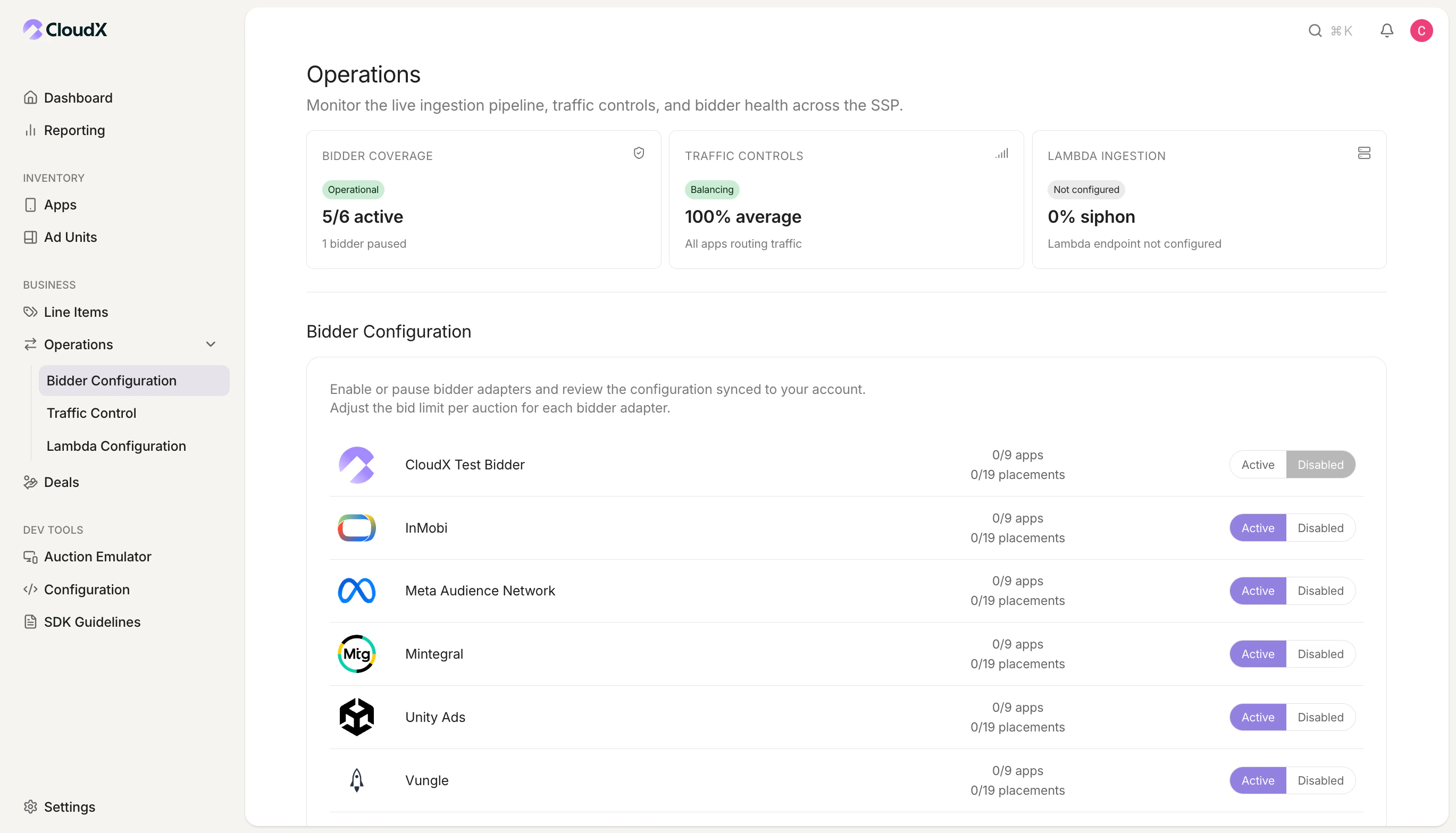 如果 `Unity Ads` 未启用,即使映射配置正确,CloudX 也不会发起竞价请求。
## 第 3 步:配置 CloudX 应用
前往 `Inventory -> Apps`,创建或打开与您的移动应用对应的应用。
| CloudX 字段 | 填写内容 | 必填 |
| --------------- | ------------------------------- | -- |
| `Unity Game ID` | 与该 CloudX 应用平台一致的 Unity Game ID | 是 |
如果 `Unity Ads` 未启用,即使映射配置正确,CloudX 也不会发起竞价请求。
## 第 3 步:配置 CloudX 应用
前往 `Inventory -> Apps`,创建或打开与您的移动应用对应的应用。
| CloudX 字段 | 填写内容 | 必填 |
| --------------- | ------------------------------- | -- |
| `Unity Game ID` | 与该 CloudX 应用平台一致的 Unity Game ID | 是 |
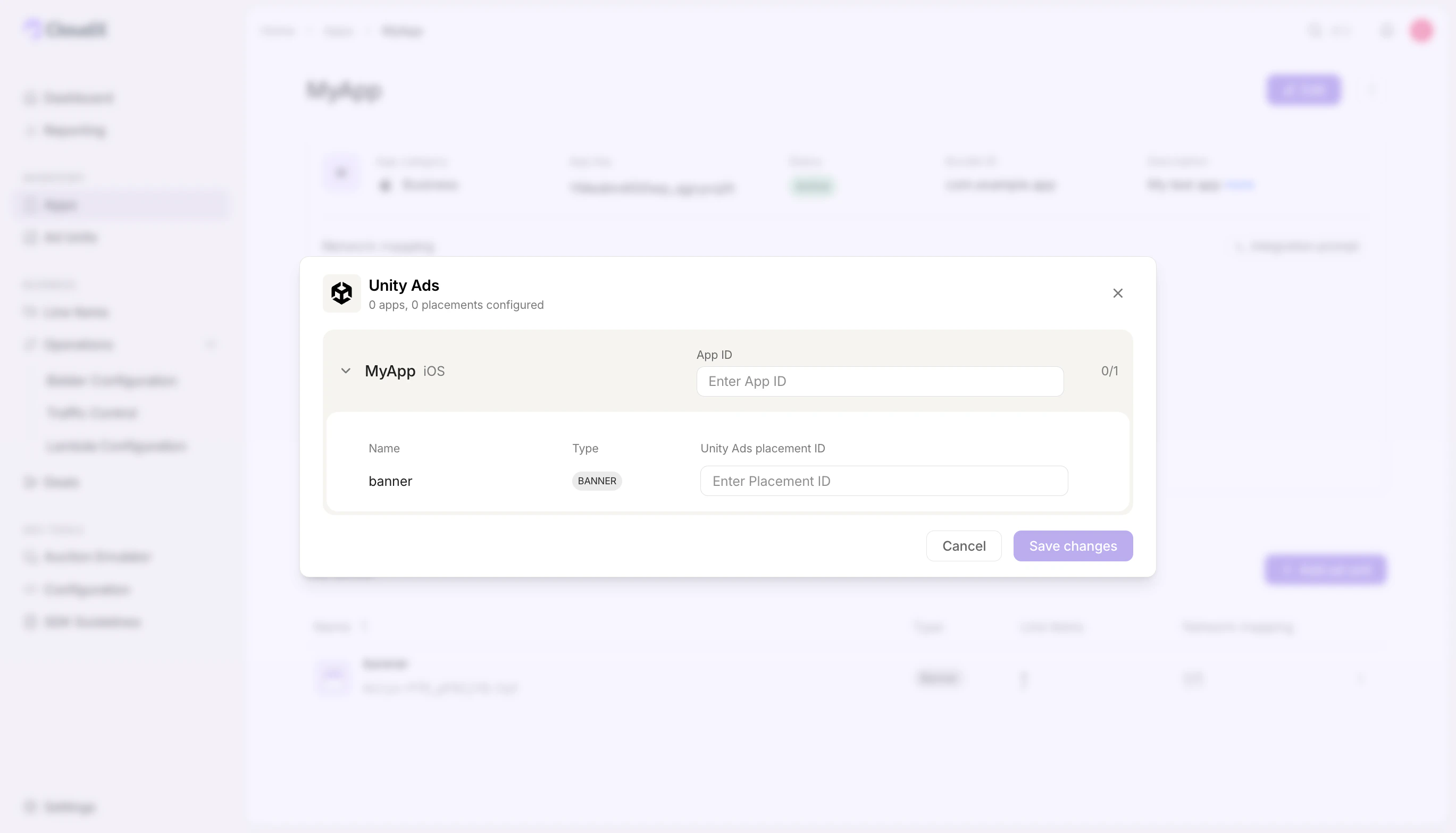 同时从应用详情页复制 CloudX `app_key`。在 Android 或 iOS 代码中使用 CloudX `app_key`。不要将 Unity Game ID 当作 CloudX SDK 的 app key。
## 第 4 步:配置 CloudX 广告单元
前往 `Inventory -> Apps -> [Your App] -> Ad units`,为每个可接入的广告单元添加如下映射。
| CloudX 字段 | 填写内容 | 必填 |
| -------------------- | ---------------------------------------- | -- |
| `Unity Placement ID` | 该广告单元和广告格式对应的 Unity bidding Placement ID | 是 |
同时从应用详情页复制 CloudX `app_key`。在 Android 或 iOS 代码中使用 CloudX `app_key`。不要将 Unity Game ID 当作 CloudX SDK 的 app key。
## 第 4 步:配置 CloudX 广告单元
前往 `Inventory -> Apps -> [Your App] -> Ad units`,为每个可接入的广告单元添加如下映射。
| CloudX 字段 | 填写内容 | 必填 |
| -------------------- | ---------------------------------------- | -- |
| `Unity Placement ID` | 该广告单元和广告格式对应的 Unity bidding Placement ID | 是 |
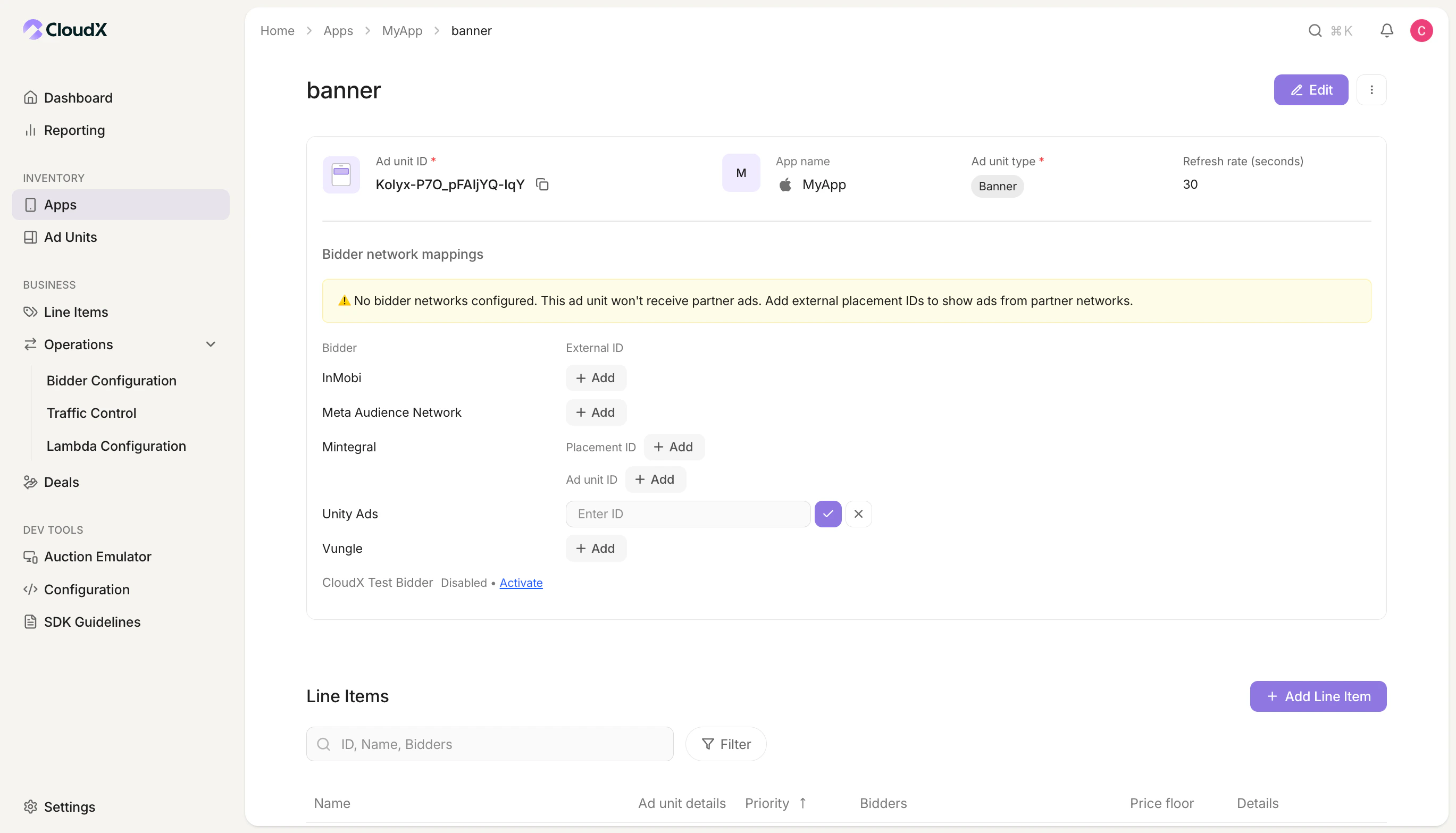 * 请复制 `Placement ID`,不要复制 placement 的显示名称。
* 让 placement 与正确的 CloudX 广告单元格式匹配。
* 确认该 placement 与 `Unity Game ID` 属于同一个 Unity 项目和同一平台。
* Unity 对每个 ad unit 只允许一个 bidding placement,因此不同广告格式需要按需创建独立的 ad unit 或 placement。
## 第 5 步:添加 Unity Ads line item
在每个需要让 Unity 参与竞争的 CloudX 广告单元上,为 bidder `Unity Ads` 创建 line item。
* 请复制 `Placement ID`,不要复制 placement 的显示名称。
* 让 placement 与正确的 CloudX 广告单元格式匹配。
* 确认该 placement 与 `Unity Game ID` 属于同一个 Unity 项目和同一平台。
* Unity 对每个 ad unit 只允许一个 bidding placement,因此不同广告格式需要按需创建独立的 ad unit 或 placement。
## 第 5 步:添加 Unity Ads line item
在每个需要让 Unity 参与竞争的 CloudX 广告单元上,为 bidder `Unity Ads` 创建 line item。
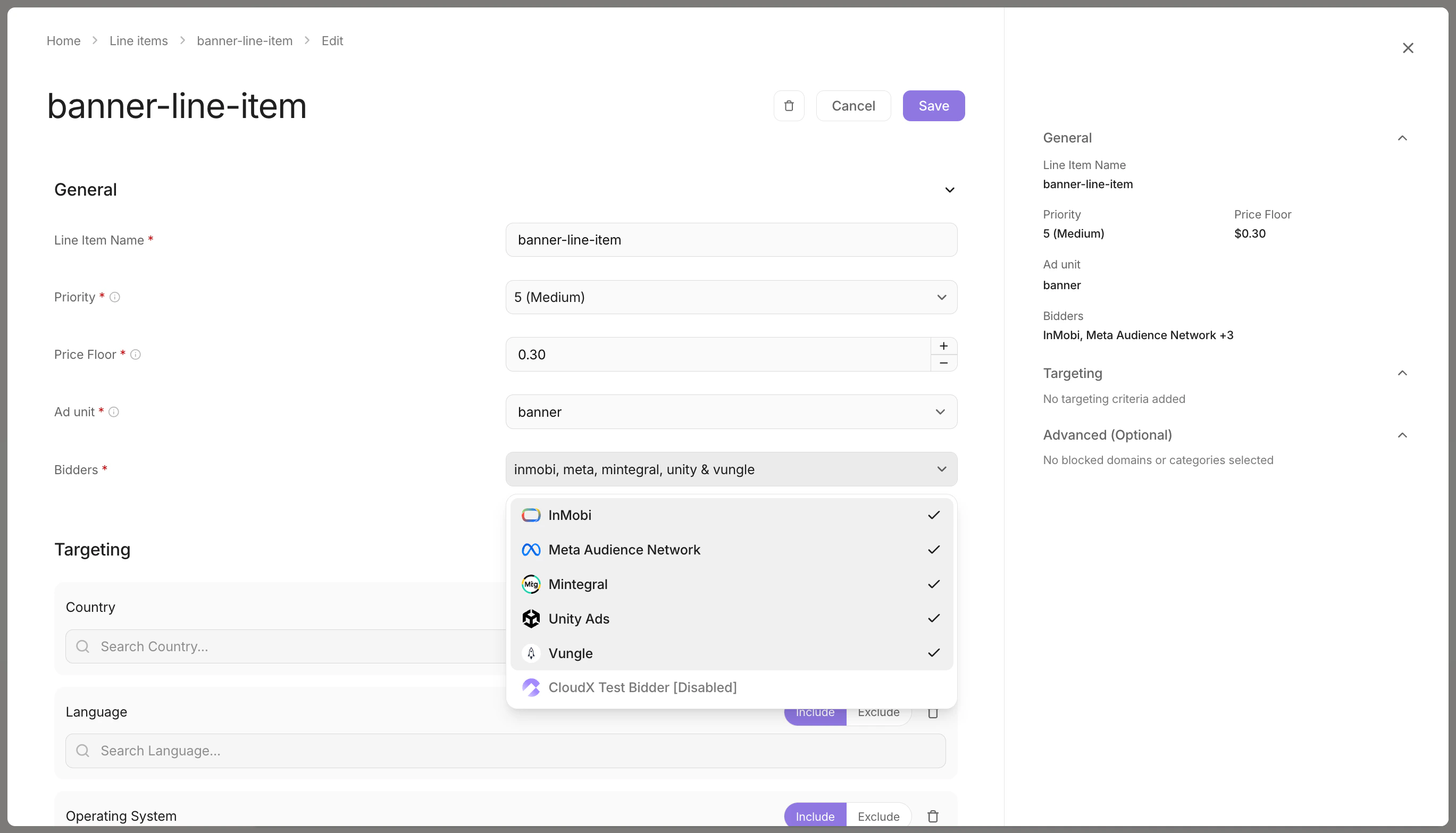 * 使用 bidder `Unity Ads`
* 让 line item 与正确的广告格式匹配
* 对每个需要 Unity Ads 参与竞价的广告单元重复上述配置
## 第 6 步:完成应用集成
请结合 CloudX 平台文档和 iOS Unity Ads 适配器页面完成集成:
* [Android 集成指南](/zh/android/integration)
* [iOS 集成指南](/zh/ios/integration)
* [Unity Ads 适配器页面](/zh/ios/adapters/unityads/overview)
在应用代码中:
* 使用 CloudX `app_key` 初始化 CloudX
* 使用 CloudX 广告单元标识符加载广告
* 不要在应用代码中传入 Unity Game ID 或 Placement ID
* 对于插屏和激励广告,仅在广告准备完成后再调用 `show()`
## 第 7 步:测试和验证
1. 在 CloudX 中为您的设备启用测试模式。
2. 使用 CloudX `app_key` 和正确的 CloudX 广告单元标识符构建并运行应用。
3. 从每个已映射的广告单元发起广告请求。
4. 确认广告能够正常加载,并且 Unity Ads 会按预期参与竞价或胜出。
## 问题排查
### Unity Ads 没有参与竞价
请先检查以下项目:
* `Unity Ads` 已在 `Operations -> Bidder Configuration` 中启用
* 应用已配置有效的 `Unity Game ID`
* 广告单元已配置有效的 `Unity Placement ID`
* 广告单元上已存在 `Unity Ads` line item
* Unity placement 是正确广告格式对应的 bidding placement
### Unity Ads 已出价但广告未正常展示
请检查以下项目:
* 您的应用使用的是 CloudX `app_key`,而不是 Unity Game ID
* 您的应用加载的是目标 CloudX 广告单元
* Unity Game ID 和 Placement ID 属于同一个 Unity 项目和同一平台
* iOS 端已完成 [Unity Ads 适配器页面](/zh/ios/adapters/unityads/overview) 中的要求
### 映射看起来正确,但仍然加载失败
Unity 相关问题通常是因为使用了错误平台的凭证,或者复制了 ad unit 名称而不是实际的 `Placement ID`。请重新检查 CloudX 中应用级别的 `Unity Game ID` 和广告单元级别的 `Unity Placement ID`。
* 使用 bidder `Unity Ads`
* 让 line item 与正确的广告格式匹配
* 对每个需要 Unity Ads 参与竞价的广告单元重复上述配置
## 第 6 步:完成应用集成
请结合 CloudX 平台文档和 iOS Unity Ads 适配器页面完成集成:
* [Android 集成指南](/zh/android/integration)
* [iOS 集成指南](/zh/ios/integration)
* [Unity Ads 适配器页面](/zh/ios/adapters/unityads/overview)
在应用代码中:
* 使用 CloudX `app_key` 初始化 CloudX
* 使用 CloudX 广告单元标识符加载广告
* 不要在应用代码中传入 Unity Game ID 或 Placement ID
* 对于插屏和激励广告,仅在广告准备完成后再调用 `show()`
## 第 7 步:测试和验证
1. 在 CloudX 中为您的设备启用测试模式。
2. 使用 CloudX `app_key` 和正确的 CloudX 广告单元标识符构建并运行应用。
3. 从每个已映射的广告单元发起广告请求。
4. 确认广告能够正常加载,并且 Unity Ads 会按预期参与竞价或胜出。
## 问题排查
### Unity Ads 没有参与竞价
请先检查以下项目:
* `Unity Ads` 已在 `Operations -> Bidder Configuration` 中启用
* 应用已配置有效的 `Unity Game ID`
* 广告单元已配置有效的 `Unity Placement ID`
* 广告单元上已存在 `Unity Ads` line item
* Unity placement 是正确广告格式对应的 bidding placement
### Unity Ads 已出价但广告未正常展示
请检查以下项目:
* 您的应用使用的是 CloudX `app_key`,而不是 Unity Game ID
* 您的应用加载的是目标 CloudX 广告单元
* Unity Game ID 和 Placement ID 属于同一个 Unity 项目和同一平台
* iOS 端已完成 [Unity Ads 适配器页面](/zh/ios/adapters/unityads/overview) 中的要求
### 映射看起来正确,但仍然加载失败
Unity 相关问题通常是因为使用了错误平台的凭证,或者复制了 ad unit 名称而不是实际的 `Placement ID`。请重新检查 CloudX 中应用级别的 `Unity Game ID` 和广告单元级别的 `Unity Placement ID`。