> ## Documentation Index
> Fetch the complete documentation index at: https://docs.cloudx.io/llms.txt
> Use this file to discover all available pages before exploring further.
# zMaticoo (BETA)
> Use this guide to configure zMaticoo bidding in CloudX.
zMaticoo is currently beta in CloudX. If it is not visible in the `Bidders` section, contact your CloudX account manager for beta access.
Keep using the platform integration guides for SDK installation and ad loading:
* [Android integration guide](/en/android/integration)
* [iOS integration guide](/en/ios/integration)
zMaticoo is a server-side bidder: CloudX requests bids on the server and renders winning creatives with the CloudX SDK's built-in renderer. There is no zMaticoo SDK or adapter to add to your app.
## Overview
Unlike SDK-based networks, zMaticoo has no credentials to configure: no account ID, no app ID, and no placement IDs. Enabling the bidder and adding line items is the entire setup.
* zMaticoo currently bids on Banner (320x50) and MREC (300x250) ad units. Additional formats will be enabled in a future rollout.
* Adding zMaticoo's app-ads.txt entries is optional but recommended — around 30% of zMaticoo's spend requires them (see Step 3).
## Step 1. Enable zMaticoo in CloudX
Go to `Bidders` in the dashboard navigation, select `zMaticoo` in the bidder list, and click `Enable`.
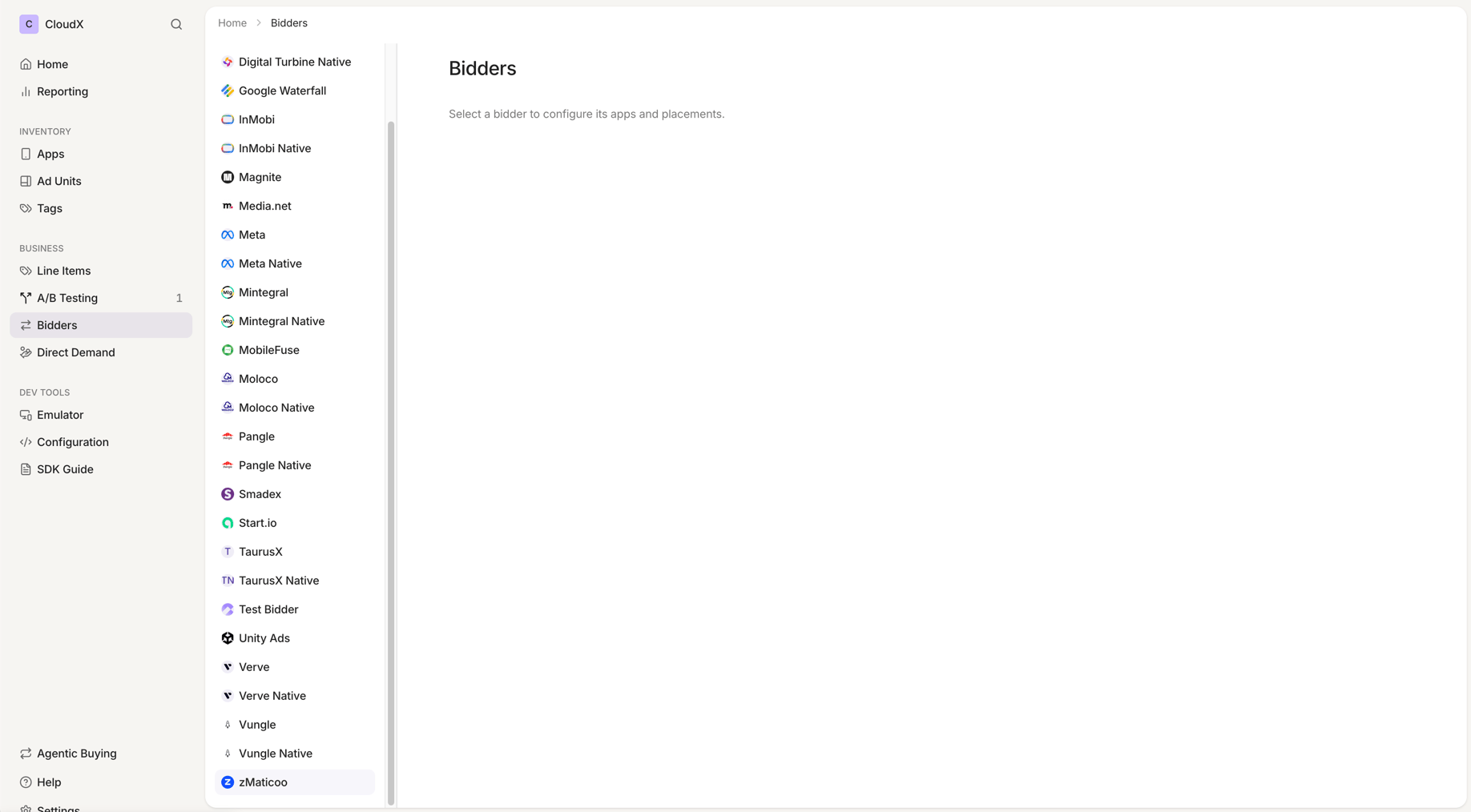 There is nothing to enter: zMaticoo has no account-level credentials. If `zMaticoo` is disabled, CloudX will not request bids from zMaticoo for any of your inventory.
## Step 2. Add zMaticoo line items
Go to `Line Items` and create line items for bidder `zMaticoo` on each CloudX ad unit where zMaticoo should compete.
There is nothing to enter: zMaticoo has no account-level credentials. If `zMaticoo` is disabled, CloudX will not request bids from zMaticoo for any of your inventory.
## Step 2. Add zMaticoo line items
Go to `Line Items` and create line items for bidder `zMaticoo` on each CloudX ad unit where zMaticoo should compete.
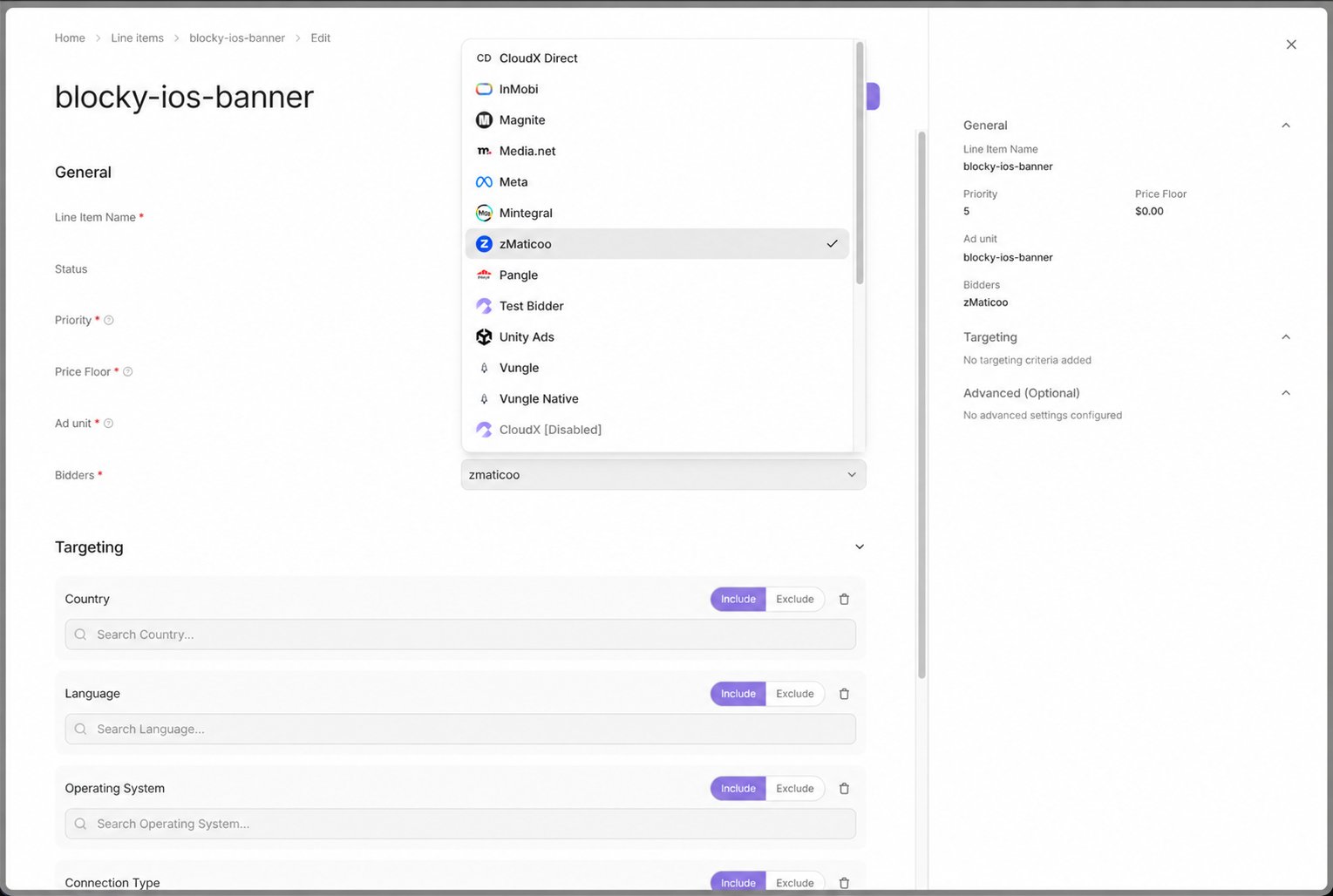 * Use bidder `zMaticoo`
* Target Banner and MREC ad units
* Repeat the setup for each ad unit where zMaticoo should bid
## Step 3. Add zMaticoo entries to your app-ads.txt
This step is optional — zMaticoo bids without it — but strongly recommended: around 30% of zMaticoo's spend comes from buyers that only buy inventory whose app-ads.txt authorizes zMaticoo's reseller entries.
app-ads.txt lives at `https://yourdomain.com/app-ads.txt`, where `yourdomain.com` is the developer website in your App Store or Google Play listing. One file covers every app published under that domain. If your store listing has no developer website, set one first: buyers cannot verify any app-ads.txt entries without it.
Append the following 24 entries to your existing file. Do not remove or modify lines that are already there — entries for other networks are unaffected by this change, and a duplicate entry is harmless if an identical line already exists in your file. Keep your CloudX `DIRECT` line in place — the zMaticoo entries add to it, they do not replace it.
```txt theme={null}
# CloudX / zMaticoo — v1 (2026-07-17)
zmaticoo.com, 51351021, RESELLER
33across.com, 0013300001kQj2HAAS, RESELLER, bbea06d9c4d2853c
admanmedia.com, 2050, RESELLER
lijit.com, 411121, RESELLER, fafdf38b16bf6b2b
media.net, 8CUFUG8L1, RESELLER
openx.com, 540274407, RESELLER, 6a698e2ec38604c6
openx.com, 562423374, RESELLER, 6a698e2ec38604c6
pubmatic.com, 156557, RESELLER
pubmatic.com, 161136, RESELLER, 5d62403b186f2ace
rubiconproject.com, 13380, RESELLER, 0bfd66d529a55807
rubiconproject.com, 18694, RESELLER, 0bfd66d529a55807
rubiconproject.com, 23644, RESELLER, 0bfd66d529a55807
rubiconproject.com, 24362, RESELLER, 0bfd66d529a55807
rubiconproject.com, 26156, RESELLER, 0bfd66d529a55807
sharethrough.com, 4457, RESELLER, d53b998a7bd4ecd2
sharethrough.com, 4457-OB, RESELLER, d53b998a7bd4ecd2
sharethrough.com, UvcAx8IL, RESELLER, d53b998a7bd4ecd2
smaato.com, 1100047713, RESELLER, 07bcf65f187117b4
smartadserver.com, 4457, RESELLER, 060d053dcf45cbf3
triplelift.com, 14705, RESELLER, 6c33edb13117fd86
triplelift.com, 14705-EB, RESELLER
video.unrulymedia.com, 158727213, RESELLER
video.unrulymedia.com, 266978658, RESELLER
zetaglobal.net, 630, RESELLER
```
The account IDs in these entries are zMaticoo's seats at each exchange. They are identical for every CloudX publisher and are not tied to your account. If your file already lists these domains with different IDs — added for another SSP or mediation platform — keep those lines and add these as well; each ID authorizes a separate path.
After you publish the updated file, buyers re-crawl app-ads.txt on their own schedules. Expect the additional zMaticoo demand to ramp gradually rather than immediately.
## Step 4. Test and validate
1. Enable test mode for your device in CloudX.
2. Build and run the app with the CloudX `app_key` and the correct CloudX ad unit identifiers.
3. Request an ad from each Banner and MREC ad unit where zMaticoo is enabled.
4. Confirm that the ad loads and that zMaticoo participates or wins where expected.
## Troubleshooting
### zMaticoo is not bidding
Check the following first:
* `zMaticoo` is enabled in the `Bidders` section
* A `zMaticoo` line item exists for the ad unit
### zMaticoo bids but the ad does not render
Check the following:
* Your app is using the CloudX `app_key` and loading the intended CloudX ad unit
* Your app is on a current CloudX SDK version — zMaticoo creatives render through the CloudX SDK's built-in renderer
If a specific creative fails consistently, contact CloudX support with the app, ad unit, and approximate time of the failure.
### Demand is lower than expected
* If you have not added the app-ads.txt entries from Step 3, around 30% of zMaticoo's spend cannot buy your inventory.
* Confirm the updated file is live at `https://yourdomain.com/app-ads.txt` and allow up to a week for buyers to re-crawl it.
* Use bidder `zMaticoo`
* Target Banner and MREC ad units
* Repeat the setup for each ad unit where zMaticoo should bid
## Step 3. Add zMaticoo entries to your app-ads.txt
This step is optional — zMaticoo bids without it — but strongly recommended: around 30% of zMaticoo's spend comes from buyers that only buy inventory whose app-ads.txt authorizes zMaticoo's reseller entries.
app-ads.txt lives at `https://yourdomain.com/app-ads.txt`, where `yourdomain.com` is the developer website in your App Store or Google Play listing. One file covers every app published under that domain. If your store listing has no developer website, set one first: buyers cannot verify any app-ads.txt entries without it.
Append the following 24 entries to your existing file. Do not remove or modify lines that are already there — entries for other networks are unaffected by this change, and a duplicate entry is harmless if an identical line already exists in your file. Keep your CloudX `DIRECT` line in place — the zMaticoo entries add to it, they do not replace it.
```txt theme={null}
# CloudX / zMaticoo — v1 (2026-07-17)
zmaticoo.com, 51351021, RESELLER
33across.com, 0013300001kQj2HAAS, RESELLER, bbea06d9c4d2853c
admanmedia.com, 2050, RESELLER
lijit.com, 411121, RESELLER, fafdf38b16bf6b2b
media.net, 8CUFUG8L1, RESELLER
openx.com, 540274407, RESELLER, 6a698e2ec38604c6
openx.com, 562423374, RESELLER, 6a698e2ec38604c6
pubmatic.com, 156557, RESELLER
pubmatic.com, 161136, RESELLER, 5d62403b186f2ace
rubiconproject.com, 13380, RESELLER, 0bfd66d529a55807
rubiconproject.com, 18694, RESELLER, 0bfd66d529a55807
rubiconproject.com, 23644, RESELLER, 0bfd66d529a55807
rubiconproject.com, 24362, RESELLER, 0bfd66d529a55807
rubiconproject.com, 26156, RESELLER, 0bfd66d529a55807
sharethrough.com, 4457, RESELLER, d53b998a7bd4ecd2
sharethrough.com, 4457-OB, RESELLER, d53b998a7bd4ecd2
sharethrough.com, UvcAx8IL, RESELLER, d53b998a7bd4ecd2
smaato.com, 1100047713, RESELLER, 07bcf65f187117b4
smartadserver.com, 4457, RESELLER, 060d053dcf45cbf3
triplelift.com, 14705, RESELLER, 6c33edb13117fd86
triplelift.com, 14705-EB, RESELLER
video.unrulymedia.com, 158727213, RESELLER
video.unrulymedia.com, 266978658, RESELLER
zetaglobal.net, 630, RESELLER
```
The account IDs in these entries are zMaticoo's seats at each exchange. They are identical for every CloudX publisher and are not tied to your account. If your file already lists these domains with different IDs — added for another SSP or mediation platform — keep those lines and add these as well; each ID authorizes a separate path.
After you publish the updated file, buyers re-crawl app-ads.txt on their own schedules. Expect the additional zMaticoo demand to ramp gradually rather than immediately.
## Step 4. Test and validate
1. Enable test mode for your device in CloudX.
2. Build and run the app with the CloudX `app_key` and the correct CloudX ad unit identifiers.
3. Request an ad from each Banner and MREC ad unit where zMaticoo is enabled.
4. Confirm that the ad loads and that zMaticoo participates or wins where expected.
## Troubleshooting
### zMaticoo is not bidding
Check the following first:
* `zMaticoo` is enabled in the `Bidders` section
* A `zMaticoo` line item exists for the ad unit
### zMaticoo bids but the ad does not render
Check the following:
* Your app is using the CloudX `app_key` and loading the intended CloudX ad unit
* Your app is on a current CloudX SDK version — zMaticoo creatives render through the CloudX SDK's built-in renderer
If a specific creative fails consistently, contact CloudX support with the app, ad unit, and approximate time of the failure.
### Demand is lower than expected
* If you have not added the app-ads.txt entries from Step 3, around 30% of zMaticoo's spend cannot buy your inventory.
* Confirm the updated file is live at `https://yourdomain.com/app-ads.txt` and allow up to a week for buyers to re-crawl it.