> ## Documentation Index
> Fetch the complete documentation index at: https://docs.cloudx.io/llms.txt
> Use this file to discover all available pages before exploring further.
# Tags
> Route ad requests to specific line items by tagging each request with one or more tag values. Use tags for house ads, catch-all inventory, A/B-style audience cuts, or any other request-level routing rule.
# Introduction
Tags let you route a single ad request to a specific subset of line items. The SDK attaches an array of tag values to the ad request, and only line items configured with a matching tag compete for that impression.
A typical use case is reserving inventory for a house ad or fallback campaign:
* The SDK tags a request with `tags = ["house_ad"]`
* Only line items with the **house\_ad** tag are eligible
* All other line items — even higher-priority ones — are skipped for that request
A request can carry one or more tags. A line item can also have multiple tags, and it is eligible when any request tag matches any line item tag.
# How matching works
CloudX uses strict isolation between tagged and untagged traffic. The presence or absence of a tag on the request fully decides which line items compete.
| Request tags | Line item tags | Result |
| ------------ | --------------------------- | -------- |
| empty | empty | Eligible |
| empty | non-empty | Skipped |
| non-empty | empty | Skipped |
| non-empty | non-empty, any matching tag | Eligible |
| non-empty | non-empty, no matching tags | Skipped |
There is no fallback between the two pools. If the SDK sends tags that no line item is configured for, the request yields no eligible line items and no auction runs. Always create the line items first, then enable the tags in the app.
# Create or edit tags for line items
Tags are part of the **Advanced (Optional)** step on the line item form.
1. Open **Line Items** and click **+ Add line item**, or edit an existing line item
2. Complete **General** and **Targeting** as usual
3. Expand **Advanced (Optional)**
4. In the **Tags** section, click any tag chip to toggle it on or off
5. To add a new tag, click **+ Create new tag**, enter a name (e.g. `Catch All`), and click **Add**
6. Click **Save**
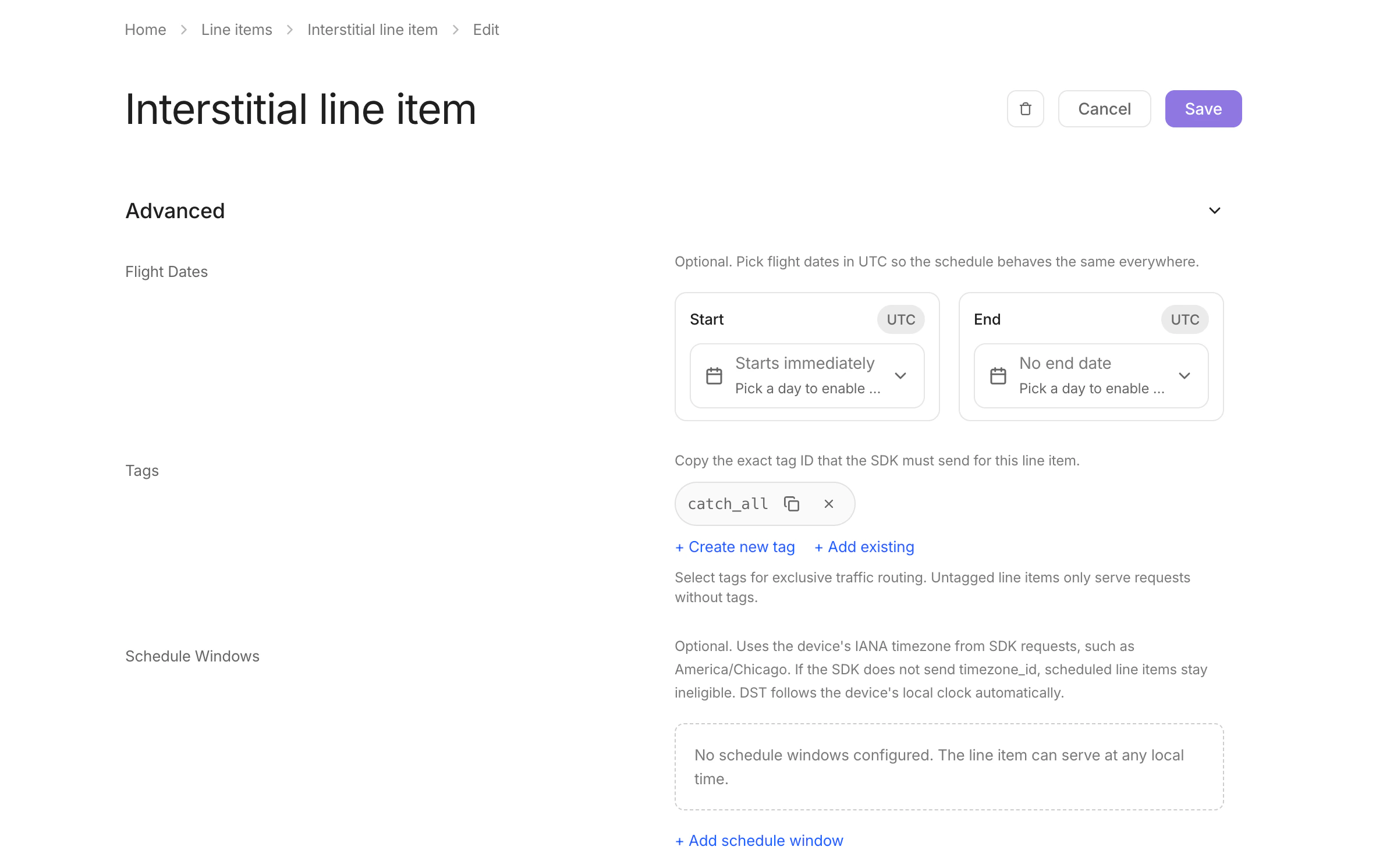 A line item with **no** tags selected only serves requests that arrive **without** tags. A line item with one or more tags selected only serves requests whose `tags` array contains at least one matching value.
Tag names are slugified on save (`Catch All` becomes `catch_all`). Use the slug in your SDK code.
# Send a tag from the SDK
Use `setExtraParameter` on the ad object to attach a tag array before calling `load`. You can change the values between loads — the SDK captures them at the time of `load`, and subsequent updates take effect on the next `load` call.
**Minimum SDK versions**
* **Android** — `setExtraParameter` is available starting in **Android SDK 3.2.0**
* **iOS** — `setExtraParameter` is available starting in **iOS SDK 3.4.0**
Older SDK versions do not transmit request tags and will only serve from untagged line items.
## Android
`setExtraParameter` is available on banners (`CloudXAdView`), interstitials and rewarded ads (`CloudXFullscreenAd`), and native ads (`CloudXNativeAdLoader`).
**Kotlin:**
```kotlin theme={null}
// Banner / MREC
adView.setExtraParameter("tags", listOf("house_ad"))
adView.load()
// Interstitial
interstitial.setExtraParameter("tags", listOf("vip", "house_ad"))
interstitial.load()
// Native
nativeAdLoader.setExtraParameter("tags", listOf("house_ad"))
nativeAdLoader.loadAd()
```
**Java:**
```java theme={null}
adView.setExtraParameter("tags", Arrays.asList("vip", "house_ad"));
adView.load();
```
To stop sending tags on subsequent loads, pass `null`:
```kotlin theme={null}
adView.setExtraParameter("tags", null)
```
## iOS
`setExtraParameter` is available on banners (`CLXBannerAdView`, `CLXBanner`), fullscreen ads (`CLXFullscreenAd`), and native ads (`CLXNativeAdLoader`).
**Swift:**
```swift theme={null}
// Banner / MREC
banner?.setExtraParameter("tags", value: ["house_ad"])
banner?.load()
// Interstitial / Rewarded
interstitial?.setExtraParameter("tags", value: ["vip", "house_ad"])
interstitial?.load()
// Native
nativeLoader?.setExtraParameter("tags", value: ["house_ad"])
nativeLoader?.load()
```
**Objective-C:**
```objc theme={null}
[self.banner setExtraParameter:@"tags" value:@[@"vip", @"house_ad"]];
[self.banner load];
```
To stop sending tags on subsequent loads, pass `nil` / `null`:
```swift theme={null}
banner?.setExtraParameter("tags", value: nil)
```
# Validate your setup
After wiring up the SDK and saving the line item, confirm the end-to-end flow before relying on tags in production:
1. In the dashboard, set the line item status to **Active**
2. In your app build, call `setExtraParameter("tags", ["..."])` before `load`
3. Trigger an ad request and confirm an impression serves from the expected line item
If the SDK starts sending tags that no active line item is configured for, those requests will not run an auction. CloudX surfaces this as a warning in server logs — coordinate the line item change and the SDK release so the line item is live first.
# Common patterns
**House ads / fallback inventory.** Create a line item with the **house\_ad** tag, and have the app send `tags = ["house_ad"]` whenever it wants the house creative to win. All other requests stay on your regular monetization pool.
**Audience cohorts.** Tag VIP or high-LTV users with `tags = ["vip"]` from your app code and configure premium line items with the **vip** tag to serve them.
**Combined routing.** Send multiple values such as `tags = ["vip", "house_ad"]` when a request should be eligible for line items configured with either tag.
A line item with **no** tags selected only serves requests that arrive **without** tags. A line item with one or more tags selected only serves requests whose `tags` array contains at least one matching value.
Tag names are slugified on save (`Catch All` becomes `catch_all`). Use the slug in your SDK code.
# Send a tag from the SDK
Use `setExtraParameter` on the ad object to attach a tag array before calling `load`. You can change the values between loads — the SDK captures them at the time of `load`, and subsequent updates take effect on the next `load` call.
**Minimum SDK versions**
* **Android** — `setExtraParameter` is available starting in **Android SDK 3.2.0**
* **iOS** — `setExtraParameter` is available starting in **iOS SDK 3.4.0**
Older SDK versions do not transmit request tags and will only serve from untagged line items.
## Android
`setExtraParameter` is available on banners (`CloudXAdView`), interstitials and rewarded ads (`CloudXFullscreenAd`), and native ads (`CloudXNativeAdLoader`).
**Kotlin:**
```kotlin theme={null}
// Banner / MREC
adView.setExtraParameter("tags", listOf("house_ad"))
adView.load()
// Interstitial
interstitial.setExtraParameter("tags", listOf("vip", "house_ad"))
interstitial.load()
// Native
nativeAdLoader.setExtraParameter("tags", listOf("house_ad"))
nativeAdLoader.loadAd()
```
**Java:**
```java theme={null}
adView.setExtraParameter("tags", Arrays.asList("vip", "house_ad"));
adView.load();
```
To stop sending tags on subsequent loads, pass `null`:
```kotlin theme={null}
adView.setExtraParameter("tags", null)
```
## iOS
`setExtraParameter` is available on banners (`CLXBannerAdView`, `CLXBanner`), fullscreen ads (`CLXFullscreenAd`), and native ads (`CLXNativeAdLoader`).
**Swift:**
```swift theme={null}
// Banner / MREC
banner?.setExtraParameter("tags", value: ["house_ad"])
banner?.load()
// Interstitial / Rewarded
interstitial?.setExtraParameter("tags", value: ["vip", "house_ad"])
interstitial?.load()
// Native
nativeLoader?.setExtraParameter("tags", value: ["house_ad"])
nativeLoader?.load()
```
**Objective-C:**
```objc theme={null}
[self.banner setExtraParameter:@"tags" value:@[@"vip", @"house_ad"]];
[self.banner load];
```
To stop sending tags on subsequent loads, pass `nil` / `null`:
```swift theme={null}
banner?.setExtraParameter("tags", value: nil)
```
# Validate your setup
After wiring up the SDK and saving the line item, confirm the end-to-end flow before relying on tags in production:
1. In the dashboard, set the line item status to **Active**
2. In your app build, call `setExtraParameter("tags", ["..."])` before `load`
3. Trigger an ad request and confirm an impression serves from the expected line item
If the SDK starts sending tags that no active line item is configured for, those requests will not run an auction. CloudX surfaces this as a warning in server logs — coordinate the line item change and the SDK release so the line item is live first.
# Common patterns
**House ads / fallback inventory.** Create a line item with the **house\_ad** tag, and have the app send `tags = ["house_ad"]` whenever it wants the house creative to win. All other requests stay on your regular monetization pool.
**Audience cohorts.** Tag VIP or high-LTV users with `tags = ["vip"]` from your app code and configure premium line items with the **vip** tag to serve them.
**Combined routing.** Send multiple values such as `tags = ["vip", "house_ad"]` when a request should be eligible for line items configured with either tag.