> ## Documentation Index
> Fetch the complete documentation index at: https://docs.cloudx.io/llms.txt
> Use this file to discover all available pages before exploring further.
# Changelog
> CloudX Dashboard release history
## 2026-07-30
### Total Revenue dashboard
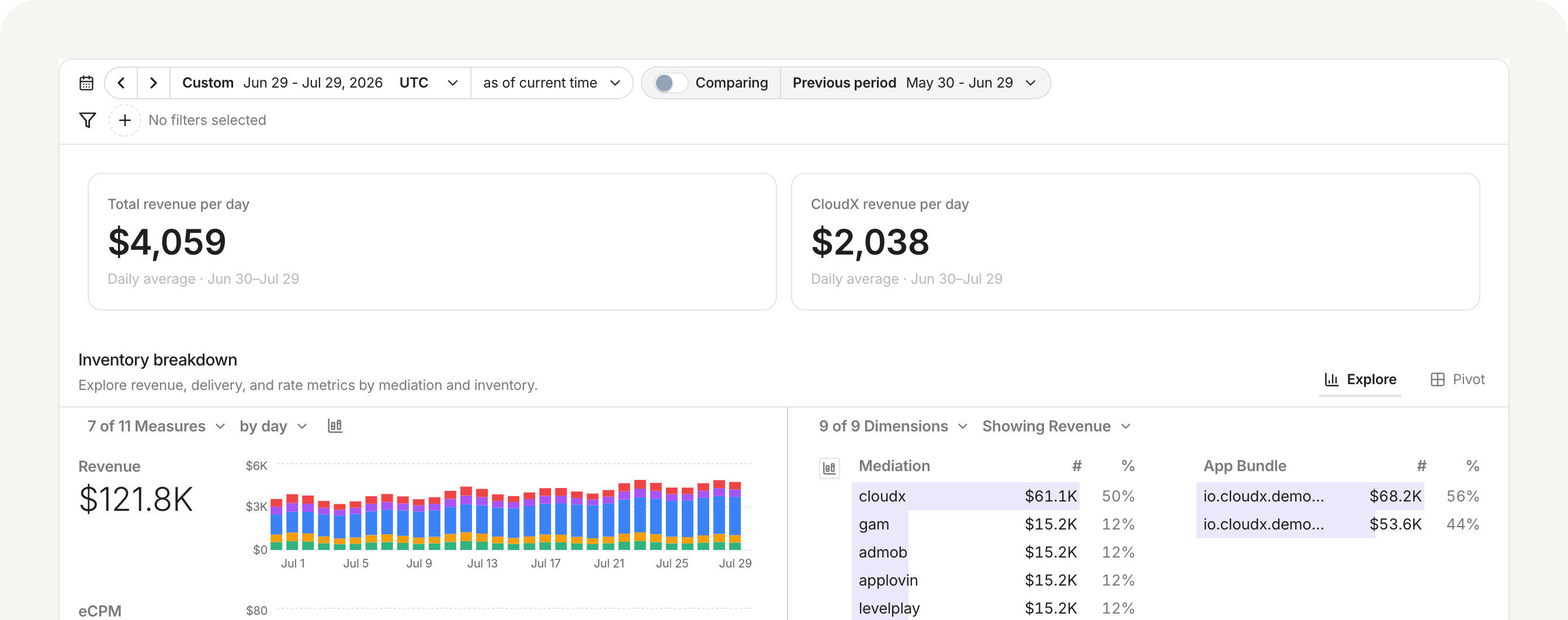 **Total Revenue** brings your CloudX and connected mediation-platform performance into one dashboard, so you can compare aggregate monetization results in one place. [Read the docs →](/en/dashboard/total-revenue)
## 2026-07-27
### Ad position overrides
You can now set the bidder-facing ad position signal when creating or editing an ad unit in the Dashboard.
Accurate position signals help bidders understand where an ad appears on screen and can improve how they value the opportunity.
* Keep **Default (recommended)** to use CloudX's current defaults: Banner sends `1` (above the fold), MREC omits the position signal, and fullscreen formats send `7` (full screen).
* Choose a value from `0` to `7` when the ad's actual on-screen position differs from the default.
* Return to **Default (recommended)** to clear a saved override.
This setting changes the bidder-facing OpenRTB/AdCOM `banner.pos` or `video.pos` field. It does not reposition the ad in your app. [Read the docs →](/en/dashboard/ad-units#ad-position-signal)
### IFA presence targeting for manual floors
Manual line-item floors can now target requests based on whether the device provides a usable advertising identifier.
* Choose **Any IFA** to leave IFA presence unrestricted.
* Choose **Has IFA** to target requests with a usable identifier.
* Choose **No IFA** to target requests where the identifier is empty, whitespace-only, unavailable, or the nil UUID (`00000000-0000-0000-0000-000000000000`).
* Combine IFA presence with country targeting to set different floors for each traffic cohort.
In YAML configuration, omit `ifa_present` for **Any IFA**, set `ifa_present: true` for **Has IFA**, or set `ifa_present: false` for **No IFA**.
## 2026-07-22
### CloudX Agent
CloudX Agent is now available throughout the Dashboard through **Ask CloudX**. It uses the current page as context and can work across inventory, configuration, reporting, auction data, and CloudX product documentation.
Use it to:
* analyze pricing opportunities and prepare floor changes by ad unit, country, or format
* create, monitor, end, and promote A/B tests
* manage bidder participation and network mappings
* diagnose eCPM and fill-rate changes
* validate inventory and import configuration from CSV or spreadsheet files
* trace published changes to a configuration version, timestamp, and author
Configuration changes require an in-chat review and explicit approval before CloudX validates and publishes them. [Read the docs →](/en/dashboard/ai-agent)
## 2026-06-19
### A/B testing result labels
The A/B testing dashboard now more clearly distinguishes result metrics and percentage-point changes.
* A/B test creation now uses a fixed 50/50 split between control and test groups
* ARPU is included in cumulative comparison metrics
* Fill rate reflects true filled auction responses divided by requests
* Customer-facing result badges use Pending, Directional, and Achieved
[Read the docs →](/en/dashboard/ab-testing)
## 2026-06-04
### Help menu resources
**Total Revenue** brings your CloudX and connected mediation-platform performance into one dashboard, so you can compare aggregate monetization results in one place. [Read the docs →](/en/dashboard/total-revenue)
## 2026-07-27
### Ad position overrides
You can now set the bidder-facing ad position signal when creating or editing an ad unit in the Dashboard.
Accurate position signals help bidders understand where an ad appears on screen and can improve how they value the opportunity.
* Keep **Default (recommended)** to use CloudX's current defaults: Banner sends `1` (above the fold), MREC omits the position signal, and fullscreen formats send `7` (full screen).
* Choose a value from `0` to `7` when the ad's actual on-screen position differs from the default.
* Return to **Default (recommended)** to clear a saved override.
This setting changes the bidder-facing OpenRTB/AdCOM `banner.pos` or `video.pos` field. It does not reposition the ad in your app. [Read the docs →](/en/dashboard/ad-units#ad-position-signal)
### IFA presence targeting for manual floors
Manual line-item floors can now target requests based on whether the device provides a usable advertising identifier.
* Choose **Any IFA** to leave IFA presence unrestricted.
* Choose **Has IFA** to target requests with a usable identifier.
* Choose **No IFA** to target requests where the identifier is empty, whitespace-only, unavailable, or the nil UUID (`00000000-0000-0000-0000-000000000000`).
* Combine IFA presence with country targeting to set different floors for each traffic cohort.
In YAML configuration, omit `ifa_present` for **Any IFA**, set `ifa_present: true` for **Has IFA**, or set `ifa_present: false` for **No IFA**.
## 2026-07-22
### CloudX Agent
CloudX Agent is now available throughout the Dashboard through **Ask CloudX**. It uses the current page as context and can work across inventory, configuration, reporting, auction data, and CloudX product documentation.
Use it to:
* analyze pricing opportunities and prepare floor changes by ad unit, country, or format
* create, monitor, end, and promote A/B tests
* manage bidder participation and network mappings
* diagnose eCPM and fill-rate changes
* validate inventory and import configuration from CSV or spreadsheet files
* trace published changes to a configuration version, timestamp, and author
Configuration changes require an in-chat review and explicit approval before CloudX validates and publishes them. [Read the docs →](/en/dashboard/ai-agent)
## 2026-06-19
### A/B testing result labels
The A/B testing dashboard now more clearly distinguishes result metrics and percentage-point changes.
* A/B test creation now uses a fixed 50/50 split between control and test groups
* ARPU is included in cumulative comparison metrics
* Fill rate reflects true filled auction responses divided by requests
* Customer-facing result badges use Pending, Directional, and Achieved
[Read the docs →](/en/dashboard/ab-testing)
## 2026-06-04
### Help menu resources
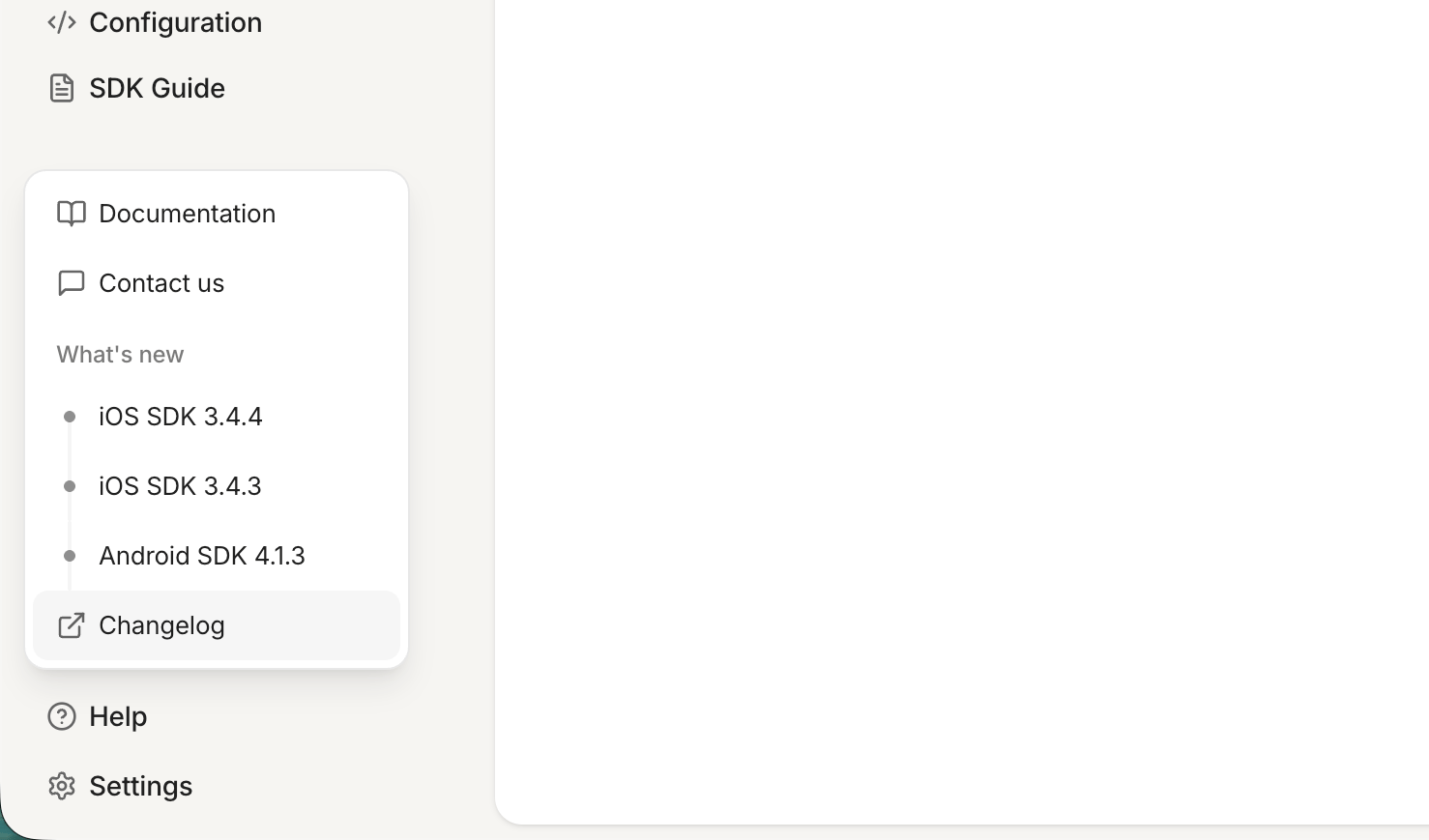 The Dashboard **Help** menu now brings product help, support, and release updates into one place.
Open **Help** in the sidebar to:
* open CloudX documentation
* contact the support team
* browse recent releases under **What's new**
* open a release preview in the in-app changelog dialog
* jump to the full docs timeline from **Changelog**
## 2026-05-15
### Frequency caps
CloudX Dashboard now supports SSP frequency caps for both ad units and segments.
You can now:
* cap a specific ad unit by `hour`, `day`, or `session`
* cap traffic routed through a specific segment
* set a default cap for requests that do not include any segments
Frequency caps are evaluated before the auction and counted on impression, so once capped inventory reaches its limit, CloudX returns no fill instead of continuing to serve. Ad-unit configuration is documented in [Ad units](/en/dashboard/ad-units).
## 2026-04-28
### A/B Testing
The Dashboard **Help** menu now brings product help, support, and release updates into one place.
Open **Help** in the sidebar to:
* open CloudX documentation
* contact the support team
* browse recent releases under **What's new**
* open a release preview in the in-app changelog dialog
* jump to the full docs timeline from **Changelog**
## 2026-05-15
### Frequency caps
CloudX Dashboard now supports SSP frequency caps for both ad units and segments.
You can now:
* cap a specific ad unit by `hour`, `day`, or `session`
* cap traffic routed through a specific segment
* set a default cap for requests that do not include any segments
Frequency caps are evaluated before the auction and counted on impression, so once capped inventory reaches its limit, CloudX returns no fill instead of continuing to serve. Ad-unit configuration is documented in [Ad units](/en/dashboard/ad-units).
## 2026-04-28
### A/B Testing
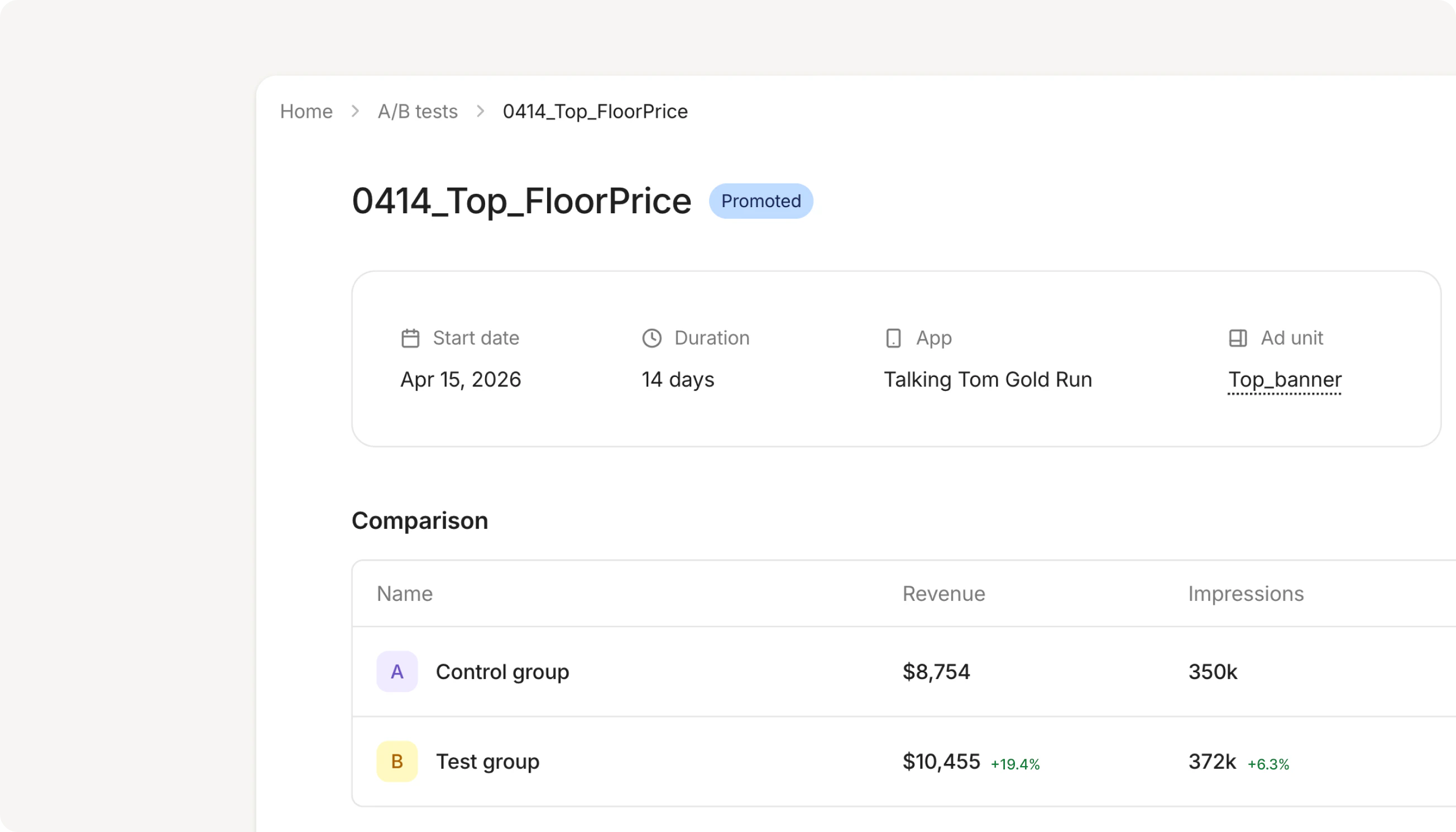 Stop guessing whether a new line item, bid floor, or network configuration will actually move the needle. **A/B Testing** lets you split impressions between your current setup and an edited variant, then watch them race head-to-head on the metrics that matter — revenue, eCPM, fill rate, and impressions — all in real time, in production.
When the data is in, promoting the winner takes a click. Open any active ad unit, hit **Create A/B test**, and start optimizing your monetization strategy with the rigor your revenue deserves. [Read the docs →](/en/dashboard/ab-testing)
Stop guessing whether a new line item, bid floor, or network configuration will actually move the needle. **A/B Testing** lets you split impressions between your current setup and an edited variant, then watch them race head-to-head on the metrics that matter — revenue, eCPM, fill rate, and impressions — all in real time, in production.
When the data is in, promoting the winner takes a click. Open any active ad unit, hit **Create A/B test**, and start optimizing your monetization strategy with the rigor your revenue deserves. [Read the docs →](/en/dashboard/ab-testing)