> ## Documentation Index
> Fetch the complete documentation index at: https://docs.cloudx.io/llms.txt
> Use this file to discover all available pages before exploring further.
# Manage ad units
> Ad units represent specific locations in your app where ads are displayed.
# Create an ad unit
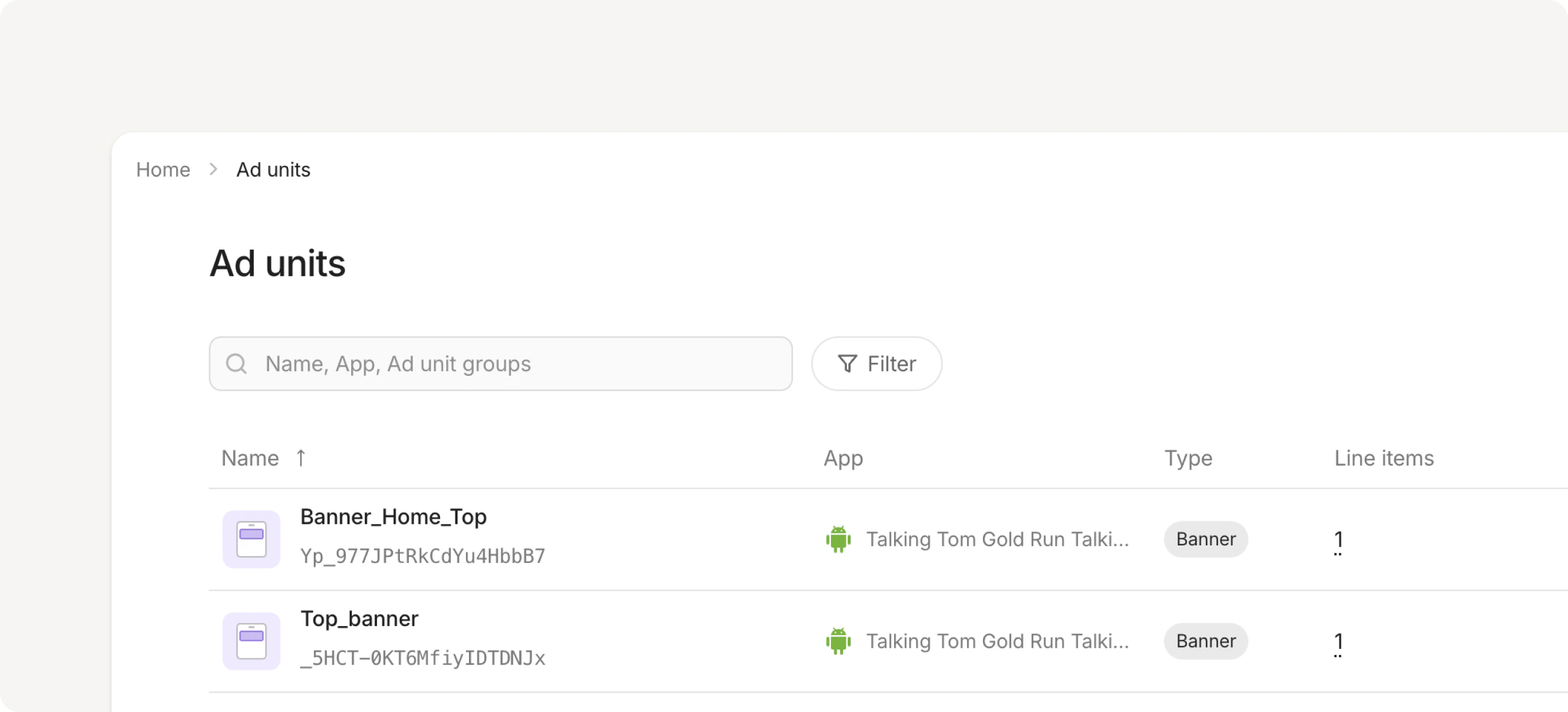
You can create ad units from the Ad Units page in the sidebar or directly from an App page. Creating from an app page pre-selects the app for you.
To create an ad unit:
1. Click **+ Add ad unit**
2. Name your ad unit that exactly matches the name in your SDK code
3. Select which app this ad unit belongs to (if not already selected)
4. Choose an ad format
5. Configure format-specific settings
6. Click **Save**
# Ad formats
| Format | Size | Description |
| ------------ | ----------- | ------------------------------------------------------------------------------ |
| Banner | 320x50 | Standard banner ads with auto-refresh |
| MREC | 300x250 | Medium rectangle ads for content feeds |
| Interstitial | Full-screen | Full-screen ads for natural transitions |
| Rewarded | Full-screen | Video ads that reward users for watching (e.g., extra lives, in-game currency) |
# Ad format settings
**1. Banner, MREC:**
Refresh rate - how often the banner ad refreshes, measured in seconds. Common values are 30, 60, or 90 seconds. Set to 0 to disable auto-refresh.
**2. Rewarded:**
* **Reward amount** - the number of items the user receives after watching the ad. For example, 10 coins or 1 extra life.
* **Reward currency** - the name of the reward. For example, coins, gems, or extra lives.
* **Reward callback URL** - a server-to-server callback URL that CloudX calls when a user completes a rewarded ad. Use this to verify rewards on your backend before granting them to the user. See [Rewarded callbacks](#rewarded-callbacks) for supported macros.
# Frequency caps
Use frequency caps to limit how many impressions the same user can see from a specific ad unit within a chosen time window.
CloudX currently supports these windows for ad-unit caps:
* `hour`
* `day`
* `session`
## Configure an ad-unit cap
1. Open **Ad Units**
2. Select the ad unit you want to update
3. In the **Frequency cap** section, enable the cap
4. Set **Max impressions**
5. Select a **Time window**
6. Click **Save changes**
Example:
* `2 / hour` means the same user can see at most 2 impressions from that ad unit in a single hour
## How enforcement works
Frequency caps are checked before the auction, but counted on impression.
That means:
* a request does **not** burn cap just because an auction ran
* the counter increments only after an ad is actually shown
* once the user is over cap, capped inventory returns **no fill**
## Notes
* Session caps require the SDK to send a session ID with the ad request.
* Ad-unit caps are evaluated independently from segment caps. If both are configured, the request must pass both checks to serve.
* The Dashboard also supports segment caps and a default cap for unsegmented traffic from the **Segments** area.
# Rewarded callbacks
CloudX sends an HTTP GET request to your callback URL each time a user completes a rewarded ad. Use this to verify the reward on your server before crediting the user.
In the **Reward callback URL** field, paste a URL that includes any of the macros below. CloudX replaces each macro with the actual value before making the request.
Example:
```
https://your-server.com/rewards?event_id={EVENT_ID}&token={EVENT_TOKEN}&amount={AMOUNT}¤cy={CURRENCY}&data={CUSTOM_DATA}&revenue={REVENUE}
```
## Supported macros
| Macro | Description | URL-encoded |
| --------------- | ---------------------------------------------------------------------------------------------------------------- | ----------- |
| `{EVENT_ID}` | Unique identifier for this reward event. | No |
| `{EVENT_TOKEN}` | Verification token derived from the Event ID. Can be used for server-side callback verification. | No |
| `{AMOUNT}` | Reward amount configured on the ad unit (numeric). Always present, defaults to `0`. | No |
| `{CURRENCY}` | Reward currency name configured on the ad unit. | Yes |
| `{CUSTOM_DATA}` | Arbitrary string passed by the SDK. Use this to attach context such as game level or user state to the callback. | Yes |
| `{REVENUE}` | Per-impression revenue value (numeric). Defaults to `0` if not available. | No |
Macros marked **URL-encoded** are percent-encoded so they are safe to use as query parameter values. If a macro's value is not set, it is replaced with an empty string — the placeholder is never sent literally.
## Retry behavior
CloudX retries the callback up to **2 times** if your server times out. Non-timeout errors (4xx, 5xx) are not retried. Make sure your endpoint responds within a few seconds.
# After creating an ad unit
Once your ad unit is created:
1. **Reference it in your SDK code** using the exact ad unit name
2. **Create line items** to define which demand sources serve ads and at what price
3. **Configure network mappings** to connect your ad unit to demand partners
 # Create an ad unit
You can create ad units from the Ad Units page in the sidebar or directly from an App page. Creating from an app page pre-selects the app for you.
To create an ad unit:
1. Click **+ Add ad unit**
2. Name your ad unit that exactly matches the name in your SDK code
3. Select which app this ad unit belongs to (if not already selected)
4. Choose an ad format
5. Configure format-specific settings
6. Click **Save**
# Ad formats
| Format | Size | Description |
| ------------ | ----------- | ------------------------------------------------------------------------------ |
| Banner | 320x50 | Standard banner ads with auto-refresh |
| MREC | 300x250 | Medium rectangle ads for content feeds |
| Interstitial | Full-screen | Full-screen ads for natural transitions |
| Rewarded | Full-screen | Video ads that reward users for watching (e.g., extra lives, in-game currency) |
# Ad format settings
**1. Banner, MREC:**
# Create an ad unit
You can create ad units from the Ad Units page in the sidebar or directly from an App page. Creating from an app page pre-selects the app for you.
To create an ad unit:
1. Click **+ Add ad unit**
2. Name your ad unit that exactly matches the name in your SDK code
3. Select which app this ad unit belongs to (if not already selected)
4. Choose an ad format
5. Configure format-specific settings
6. Click **Save**
# Ad formats
| Format | Size | Description |
| ------------ | ----------- | ------------------------------------------------------------------------------ |
| Banner | 320x50 | Standard banner ads with auto-refresh |
| MREC | 300x250 | Medium rectangle ads for content feeds |
| Interstitial | Full-screen | Full-screen ads for natural transitions |
| Rewarded | Full-screen | Video ads that reward users for watching (e.g., extra lives, in-game currency) |
# Ad format settings
**1. Banner, MREC:**
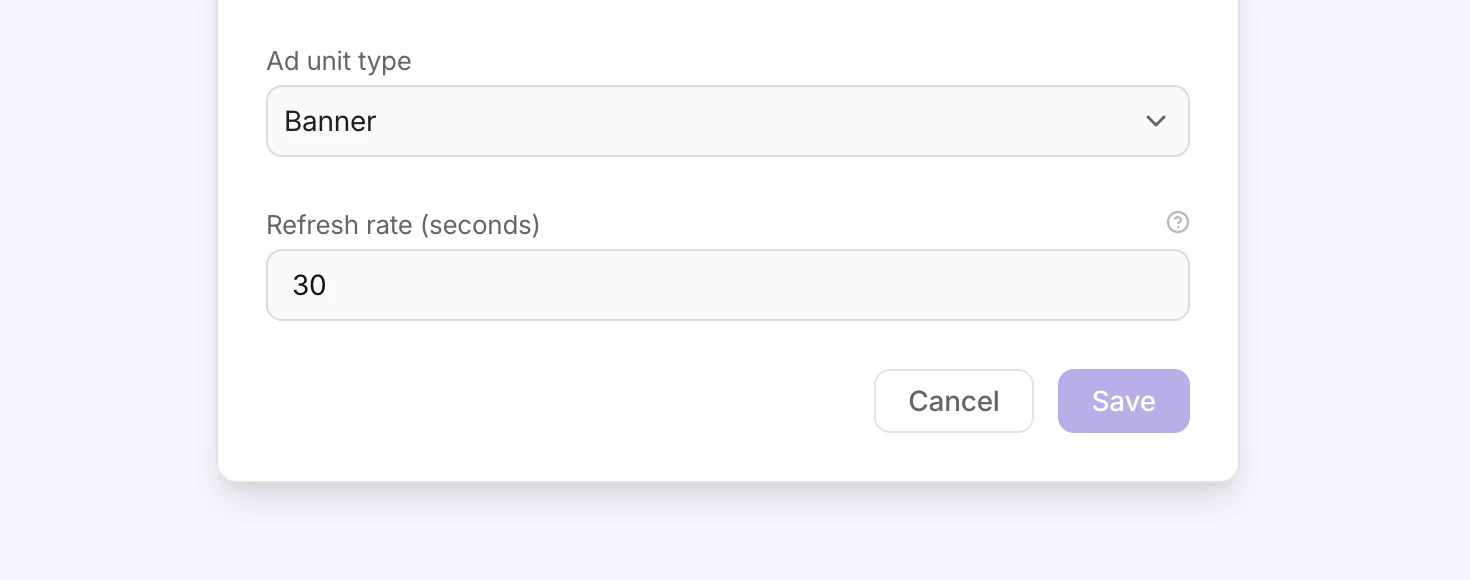 Refresh rate - how often the banner ad refreshes, measured in seconds. Common values are 30, 60, or 90 seconds. Set to 0 to disable auto-refresh.
**2. Rewarded:**
Refresh rate - how often the banner ad refreshes, measured in seconds. Common values are 30, 60, or 90 seconds. Set to 0 to disable auto-refresh.
**2. Rewarded:**
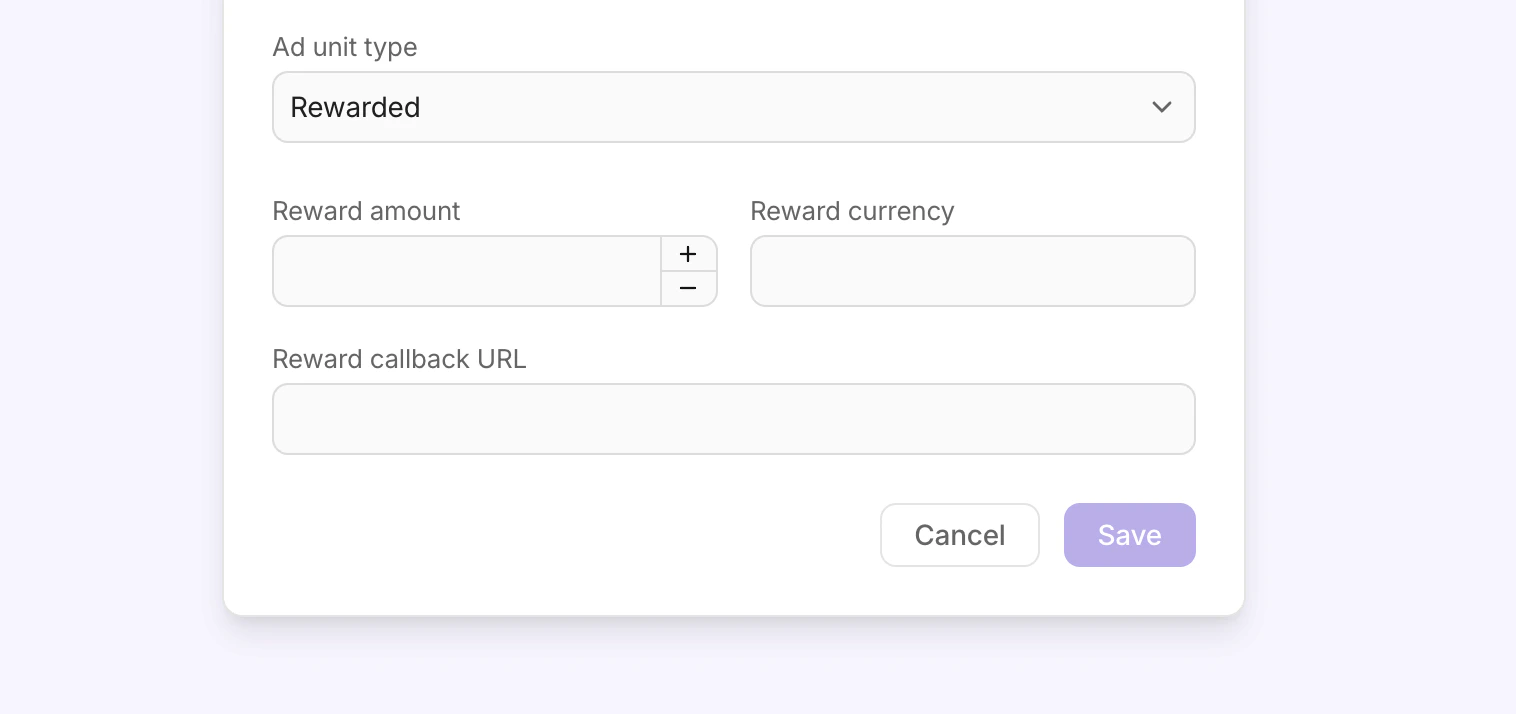 * **Reward amount** - the number of items the user receives after watching the ad. For example, 10 coins or 1 extra life.
* **Reward currency** - the name of the reward. For example, coins, gems, or extra lives.
* **Reward callback URL** - a server-to-server callback URL that CloudX calls when a user completes a rewarded ad. Use this to verify rewards on your backend before granting them to the user. See [Rewarded callbacks](#rewarded-callbacks) for supported macros.
# Frequency caps
Use frequency caps to limit how many impressions the same user can see from a specific ad unit within a chosen time window.
CloudX currently supports these windows for ad-unit caps:
* `hour`
* `day`
* `session`
## Configure an ad-unit cap
1. Open **Ad Units**
2. Select the ad unit you want to update
3. In the **Frequency cap** section, enable the cap
4. Set **Max impressions**
5. Select a **Time window**
6. Click **Save changes**
Example:
* `2 / hour` means the same user can see at most 2 impressions from that ad unit in a single hour
## How enforcement works
Frequency caps are checked before the auction, but counted on impression.
That means:
* a request does **not** burn cap just because an auction ran
* the counter increments only after an ad is actually shown
* once the user is over cap, capped inventory returns **no fill**
## Notes
* Session caps require the SDK to send a session ID with the ad request.
* Ad-unit caps are evaluated independently from segment caps. If both are configured, the request must pass both checks to serve.
* The Dashboard also supports segment caps and a default cap for unsegmented traffic from the **Segments** area.
# Rewarded callbacks
CloudX sends an HTTP GET request to your callback URL each time a user completes a rewarded ad. Use this to verify the reward on your server before crediting the user.
In the **Reward callback URL** field, paste a URL that includes any of the macros below. CloudX replaces each macro with the actual value before making the request.
Example:
```
https://your-server.com/rewards?event_id={EVENT_ID}&token={EVENT_TOKEN}&amount={AMOUNT}¤cy={CURRENCY}&data={CUSTOM_DATA}&revenue={REVENUE}
```
## Supported macros
| Macro | Description | URL-encoded |
| --------------- | ---------------------------------------------------------------------------------------------------------------- | ----------- |
| `{EVENT_ID}` | Unique identifier for this reward event. | No |
| `{EVENT_TOKEN}` | Verification token derived from the Event ID. Can be used for server-side callback verification. | No |
| `{AMOUNT}` | Reward amount configured on the ad unit (numeric). Always present, defaults to `0`. | No |
| `{CURRENCY}` | Reward currency name configured on the ad unit. | Yes |
| `{CUSTOM_DATA}` | Arbitrary string passed by the SDK. Use this to attach context such as game level or user state to the callback. | Yes |
| `{REVENUE}` | Per-impression revenue value (numeric). Defaults to `0` if not available. | No |
Macros marked **URL-encoded** are percent-encoded so they are safe to use as query parameter values. If a macro's value is not set, it is replaced with an empty string — the placeholder is never sent literally.
## Retry behavior
CloudX retries the callback up to **2 times** if your server times out. Non-timeout errors (4xx, 5xx) are not retried. Make sure your endpoint responds within a few seconds.
# After creating an ad unit
Once your ad unit is created:
1. **Reference it in your SDK code** using the exact ad unit name
2. **Create line items** to define which demand sources serve ads and at what price
3. **Configure network mappings** to connect your ad unit to demand partners
* **Reward amount** - the number of items the user receives after watching the ad. For example, 10 coins or 1 extra life.
* **Reward currency** - the name of the reward. For example, coins, gems, or extra lives.
* **Reward callback URL** - a server-to-server callback URL that CloudX calls when a user completes a rewarded ad. Use this to verify rewards on your backend before granting them to the user. See [Rewarded callbacks](#rewarded-callbacks) for supported macros.
# Frequency caps
Use frequency caps to limit how many impressions the same user can see from a specific ad unit within a chosen time window.
CloudX currently supports these windows for ad-unit caps:
* `hour`
* `day`
* `session`
## Configure an ad-unit cap
1. Open **Ad Units**
2. Select the ad unit you want to update
3. In the **Frequency cap** section, enable the cap
4. Set **Max impressions**
5. Select a **Time window**
6. Click **Save changes**
Example:
* `2 / hour` means the same user can see at most 2 impressions from that ad unit in a single hour
## How enforcement works
Frequency caps are checked before the auction, but counted on impression.
That means:
* a request does **not** burn cap just because an auction ran
* the counter increments only after an ad is actually shown
* once the user is over cap, capped inventory returns **no fill**
## Notes
* Session caps require the SDK to send a session ID with the ad request.
* Ad-unit caps are evaluated independently from segment caps. If both are configured, the request must pass both checks to serve.
* The Dashboard also supports segment caps and a default cap for unsegmented traffic from the **Segments** area.
# Rewarded callbacks
CloudX sends an HTTP GET request to your callback URL each time a user completes a rewarded ad. Use this to verify the reward on your server before crediting the user.
In the **Reward callback URL** field, paste a URL that includes any of the macros below. CloudX replaces each macro with the actual value before making the request.
Example:
```
https://your-server.com/rewards?event_id={EVENT_ID}&token={EVENT_TOKEN}&amount={AMOUNT}¤cy={CURRENCY}&data={CUSTOM_DATA}&revenue={REVENUE}
```
## Supported macros
| Macro | Description | URL-encoded |
| --------------- | ---------------------------------------------------------------------------------------------------------------- | ----------- |
| `{EVENT_ID}` | Unique identifier for this reward event. | No |
| `{EVENT_TOKEN}` | Verification token derived from the Event ID. Can be used for server-side callback verification. | No |
| `{AMOUNT}` | Reward amount configured on the ad unit (numeric). Always present, defaults to `0`. | No |
| `{CURRENCY}` | Reward currency name configured on the ad unit. | Yes |
| `{CUSTOM_DATA}` | Arbitrary string passed by the SDK. Use this to attach context such as game level or user state to the callback. | Yes |
| `{REVENUE}` | Per-impression revenue value (numeric). Defaults to `0` if not available. | No |
Macros marked **URL-encoded** are percent-encoded so they are safe to use as query parameter values. If a macro's value is not set, it is replaced with an empty string — the placeholder is never sent literally.
## Retry behavior
CloudX retries the callback up to **2 times** if your server times out. Non-timeout errors (4xx, 5xx) are not retried. Make sure your endpoint responds within a few seconds.
# After creating an ad unit
Once your ad unit is created:
1. **Reference it in your SDK code** using the exact ad unit name
2. **Create line items** to define which demand sources serve ads and at what price
3. **Configure network mappings** to connect your ad unit to demand partners